



You pick up the phone to close a deal, but your client sounds like they’re speaking from the bottom of a well. Words cut out. Audio stutters. The connection drops entirely. This isn’t just annoying; it’s expensive. For businesses relying on Voice over Internet Protocol, these moments usually happen at the worst possible time: during peak business hours when everyone is online, streaming, and transferring files simultaneously.
Network congestion doesn't just slow down your internet browsing; it actively destroys voice call quality. Unlike loading a webpage, which can wait for data packets to arrive in any order, voice calls require real-time delivery. If the network gets clogged, your voice data gets stuck in traffic, resulting in choppy audio or total silence. Fixing this requires more than just upgrading your internet plan. It demands a strategic overhaul of how your network handles priority traffic.
The Four Metrics That Kill Call Quality
To troubleshoot VoIP issues, you first need to understand what is actually breaking. It’s rarely one single thing. Instead, it’s a combination of four technical metrics that degrade when your network hits capacity. Knowing these numbers helps you diagnose whether the problem lies with your internal setup or your Internet Service Provider (ISP).
- Bandwidth: Think of this as the size of the pipe carrying your data. For VoIP, you need roughly 80-100 kilobits per second (kbps) per concurrent call. If ten people are on the phone, you need at least 800-1000 kbps dedicated solely to voice. If other applications eat up this space, calls suffer.
- Latency: This is the delay between when you speak and when the other person hears you. Industry standards state that latency should stay below 150 milliseconds (ms). Anything higher creates an awkward pause where people talk over each other.
- Jitter: Jitter is the variation in packet arrival times. If packets arrive unevenly, the audio sounds robotic or garbled. Acceptable jitter is less than 30 ms. High jitter is often the first sign of network instability.
- Packet Loss: When data packets fail to reach their destination, words disappear from the conversation. Even a small loss rate of 1-2% can make a call unintelligible.
When you hear static or gaps in conversation, check these metrics. If jitter spikes only during lunchtime, look for local interference. If latency rises across the board during the afternoon rush, your bandwidth is likely saturated by non-voice traffic.
Why Peak Hours Are Different
Network behavior changes drastically depending on the time of day. At 9:00 AM, your team might be logging into cloud services, syncing emails, and starting video conferences. By noon, large file backups might kick off automatically. These activities compete directly with voice traffic for the same resources.
The core issue is that standard networks treat all data equally. A massive spreadsheet upload has the same priority as a live customer support call. In a congested network, the spreadsheet wins because it sends larger chunks of data, pushing smaller voice packets into a waiting queue. By the time those voice packets get through, the moment has passed, and the audio is ruined.
To identify if this is your problem, run diagnostic tests at different times. Use tools that measure jitter and latency specifically during high-usage periods. If performance drops significantly between 10:00 AM and 2:00 PM but is fine at 6:00 PM, you have a classic peak-hour congestion issue. This pattern confirms that your infrastructure lacks the mechanisms to prioritize critical communications over general data usage.
Implementing Quality of Service (QoS)
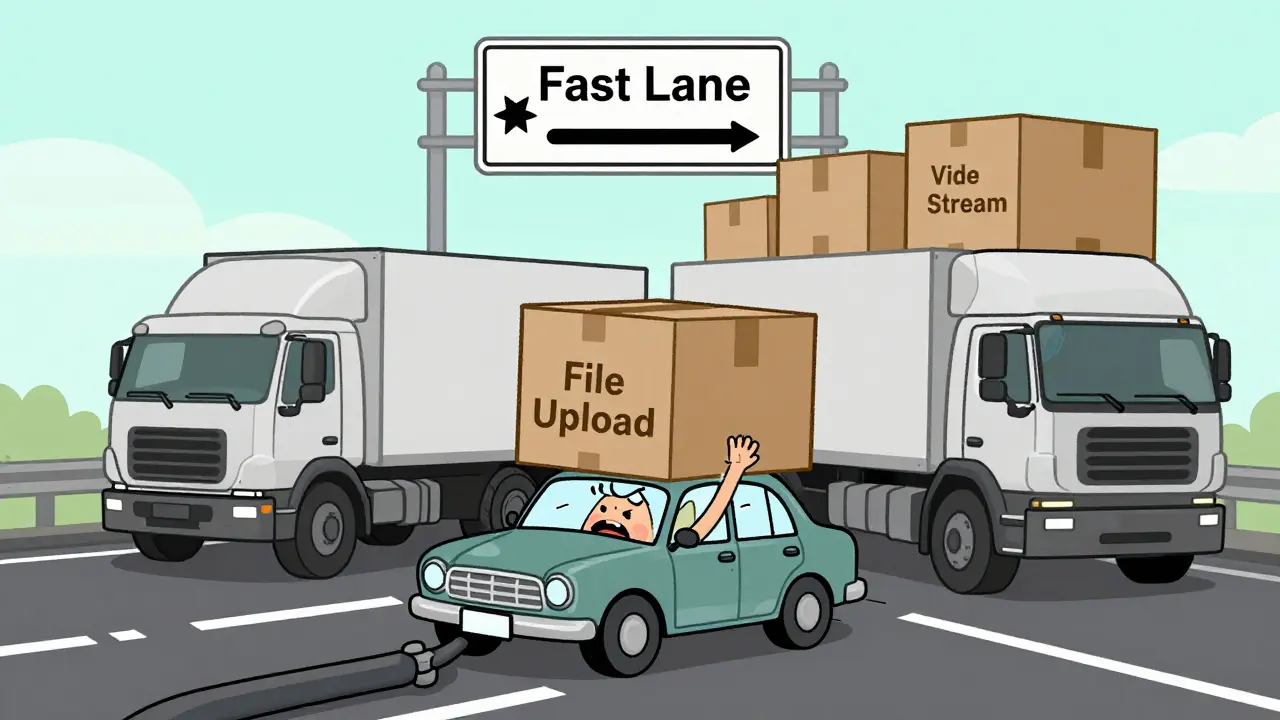
The most effective technical solution for managing VoIP during congestion is Quality of Service (QoS). QoS allows your router to inspect incoming data packets and decide which ones get to go first. It acts like a fast lane on a highway, ensuring that emergency vehicles-or in this case, voice calls-aren't stuck behind commercial trucks.
Setting up QoS correctly involves specific configurations. You need to assign DSCP Class 46 to all voice packets. This code tells networking equipment that this traffic is highly sensitive to delay and must be processed immediately. Without this tag, your router treats voice data as best-effort traffic, which means it gets dropped first when the network gets busy.
| Setting | Recommended Value | Purpose |
|---|---|---|
| DSCP Tagging | Class 46 (EF) | Marks voice packets for highest priority handling |
| Bandwidth Reservation | 20-30% of Total Upstream | Guarantees minimum capacity for voice regardless of load |
| Jitter Buffer | Adaptive | Smooths out minor variations in packet arrival times |
| UDP Timeout | Increase Default | Prevents premature disconnection of long calls |
Remember, QoS does not increase your total internet speed. It simply ensures that the speed you do have is used efficiently. If your pipe is too small, even perfect QoS won't save you. However, if you have adequate bandwidth but poor prioritization, QoS will instantly improve call clarity during busy periods.
Network Architecture and Hardware Upgrades
Software settings alone cannot fix hardware limitations. Many businesses use consumer-grade routers that lack the processing power to handle complex QoS rules under heavy load. These devices often throttle performance when performing deep packet inspection, adding unwanted latency to every call.
Switching to Business-grade routers makes a significant difference. These devices are designed to handle multiple simultaneous streams of encrypted voice data without slowing down. Look for features like Cut-Through Forwarding (CTF), which speeds up local network performance by forwarding packets before fully inspecting them, reducing internal delays.
Additionally, consider your physical connections. Wi-Fi is convenient but inherently unstable for voice. Wireless signals suffer from interference from microwaves, Bluetooth devices, and neighboring networks. Whenever possible, connect IP phones and softphone computers via wired Ethernet. If wiring isn't an option, ensure your Wi-Fi operates on a less congested channel and uses modern standards like Wi-Fi 6, which handles multiple devices better than older protocols.

Traffic Management and User Policies
Technology solves half the battle; user behavior solves the rest. No amount of QoS can compensate for a staff member downloading a 5GB game update while taking a conference call. Implementing strict traffic management policies is essential for maintaining peak-hour performance.
Schedule large data transfers outside of business hours. Configure backup systems, cloud syncs, and software updates to run after 6:00 PM or on weekends. This frees up bandwidth during the day when voice traffic is critical. Encourage employees to close unused browser tabs and idle applications that consume background bandwidth. Even lightweight apps can add up when dozens of users are active simultaneously.
If your organization relies heavily on video conferencing, consider limiting resolution quality during peak times. Video consumes significantly more bandwidth than audio-only calls. Reducing video bitrate can free up enough capacity to keep voice calls clear without sacrificing visual communication entirely.
Advanced Troubleshooting Steps
If basic QoS and hardware upgrades don't resolve the issue, dig deeper into specific technical configurations. One common culprit is UDP timeout settings on your router. Some routers automatically disconnect inactive UDP connections after a set period, causing calls to drop unexpectedly. Increasing the UDP timeout duration in your router settings can prevent these abrupt disconnections.
Another area to investigate is firewall inspection. Deep Packet Inspection (DPI) firewalls examine every packet for threats, which adds processing time. While security is vital, excessive inspection can introduce latency. Configure your firewall to bypass inspection for trusted VoIP ports and protocols, allowing voice traffic to flow freely while still monitoring other data types.
Finally, evaluate your ISP's performance. If your internal network is optimized but calls still degrade, the bottleneck might be external. Contact your provider to request a line test during peak hours. Ask about Weighted Fair Queuing (WFQ) support on their end, which helps manage traffic distribution across their network. In some cases, switching to a provider with lower latency or higher guaranteed uptime may be necessary.
How much bandwidth do I need for VoIP calls?
You need approximately 80-100 kbps per concurrent call. For example, if you expect 10 simultaneous calls, you should reserve at least 800-1000 kbps of your total bandwidth exclusively for voice traffic. This ensures that other applications do not starve the voice data of necessary resources.
What is the difference between latency and jitter?
Latency is the total delay in sending data, measured in milliseconds. Jitter is the variation in that delay. High latency causes pauses in conversation, while high jitter causes choppy or distorted audio. Both degrade call quality, but they require different troubleshooting approaches.
Can QoS fix slow internet speeds?
No, QoS does not increase your total internet speed. It only prioritizes certain types of traffic, such as VoIP, over others. If your overall bandwidth is insufficient, you will still experience congestion. QoS works best when you have adequate bandwidth but need to manage how it is distributed among competing applications.
Why do my VoIP calls drop after a few minutes?
This is often caused by UDP timeout settings on your router. Routers may automatically disconnect inactive UDP connections to conserve resources. Increasing the UDP timeout duration in your router configuration can prevent these unexpected disconnections during long calls.
Should I use Wi-Fi or Ethernet for VoIP phones?
Ethernet is always preferred for VoIP phones because it provides a stable, dedicated connection immune to wireless interference. Wi-Fi is susceptible to signal degradation from walls, other devices, and environmental factors, leading to increased jitter and packet loss.








Kasey Drymalla
5 May 2026 at 09:35its all a conspiracy to make us buy more routers
i mean think about it
why would they just let us talk for free
the big tech companies want us stressed out so we cant organize
every time i try to call someone the connection drops right when i say something important
it feels like they are listening and blocking me on purpose
you guys are talking about qos settings but thats just a distraction
they want you to focus on technical stuff while they steal your data
i tried using ethernet once and my phone started acting weird
probably planted a bug in the cable
stop trying to fix it with software updates
just use walkie talkies or better yet write letters
the internet is rigged against normal people anyway
my neighbor says his calls are fine but he works for google so i dont trust him