



Have you ever wondered why your high-quality call suddenly drops to robotic-sounding audio the moment it hits the public telephone network? Or why a video conference freezes while the screen share remains smooth? The answer usually lies in a silent, text-based handshake happening milliseconds before you hear the first "hello." This process is called codec negotiation, and it relies entirely on the Session Description Protocol (SDP). Without this precise matching of capabilities, Voice over IP (VoIP) calls would simply fail to connect or produce unintelligible noise.
In this guide, we will break down how endpoints agree on which audio or video format to use, why certain codecs are chosen over others, and how to troubleshoot when this negotiation goes wrong. We will move beyond abstract theory into the actual lines of code and configuration files that make real-time communication possible.
The Mechanics of the Offer/Answer Model
At its core, codec negotiation is a conversation defined by RFC 3264, an IETF standard known as the SDP Offer/Answer Model. Imagine two people trying to meet for lunch. One person sends a list of restaurants they like (the Offer), and the other replies with the specific restaurant they both can attend (the Answer). In VoIP, this happens inside SIP messages like `INVITE` and `200 OK`.
The caller’s device creates an SDP Offer. This is a text block listing every media stream it supports-audio, video, data-and the specific codecs available for each. For example, it might say, "I can send audio using G.711, G.729, or Opus." The receiving endpoint parses this list, checks its own internal capabilities, and generates an SDP Answer. Crucially, the Answer cannot introduce new codecs that weren't in the Offer. It must be a subset. If there is no overlap between the two lists, the call fails immediately because there is no common language for the media stream.
This strict rule prevents ambiguity. If Endpoint A offers Codec X and Endpoint B answers with Codec Y (which A didn't offer), Endpoint A won't know how to decode the incoming stream. The result is silence or garbled static. Therefore, the intersection of supported codecs determines the final quality and bandwidth usage of the call.
Anatomy of an SDP Packet
To understand what is being negotiated, you need to look at the structure of the SDP body itself. It is a simple, line-oriented text format where each line starts with a single-letter tag followed by an equals sign and a value. Here are the critical fields involved in codec matching:
- v= (Version): Always 0 for current SDP versions.
- m= (Media): This is the most important line for codec negotiation. It defines the media type (e.g., audio), port number, transport protocol (usually RTP/AVP), and a space-separated list of payload type numbers. An example looks like: `m=audio 49170 RTP/AVP 0 8 101`. Here, 0, 8, and 101 are the payload types offered.
- a=rtpmap: This attribute maps the numeric payload type to a human-readable codec name and clock rate. For instance, `a=rtpmap:0 PCMU/8000` tells us that payload type 0 is G.711 µ-law running at 8kHz.
- a=fmtp: This carries format-specific parameters. For variable-bitrate codecs like Opus, this line specifies constraints such as maximum bitrate or packetization time (`ptime`).
- c= (Connection): Provides the IP address where the media should be sent.
When an engineer traces a call failure, they often look at the `m=` line first. If the Answer removes a payload type from the Offer without replacing it, or if the `a=rtpmap` definitions don't match exactly, the media session breaks. Precision here is non-negotiable.
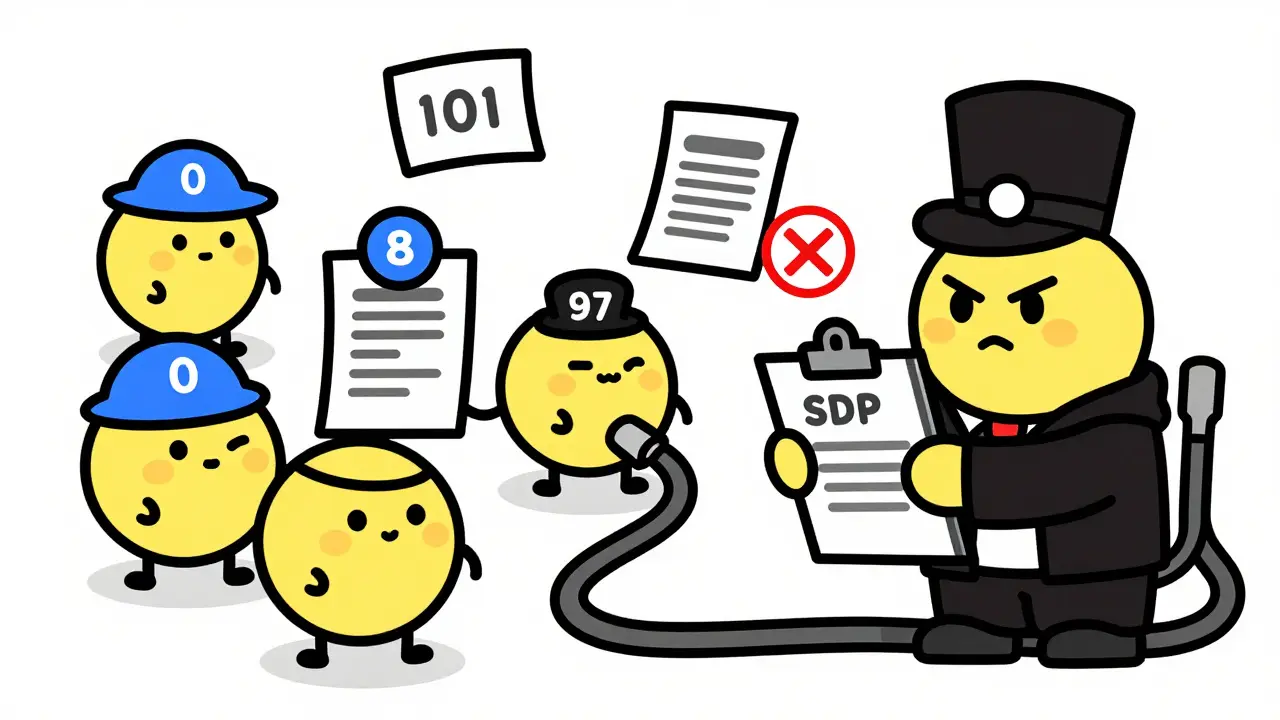
Payload Types: Static vs. Dynamic
Not all codec identifiers are created equal. SDP uses two categories of payload types, and understanding the difference is vital for troubleshooting interoperability issues.
| Feature | Static Payload Types | Dynamic Payload Types |
|---|---|---|
| Range | 0-95 | 96-127 |
| Definition | Fixed by IETF standards (e.g., 0 is always PCMU) | Defined locally within the SDP Offer via `a=rtpmap` |
| Common Codecs | G.711 (µ-law/A-law), G.722, GSM | G.729, Opus, AMR-WB, VP8, H.264 |
| Negotiation Rule | No `a=rtpmap` needed; universally understood | Must include `a=rtpmap` to define the codec identity |
Static types are convenient because any compliant device knows that payload type 0 means G.711 µ-law. However, modern VoIP relies heavily on dynamic types (96-127) to support newer, more efficient codecs like Opus, a royalty-free, versatile audio codec designed for interactive communications. When using dynamic types, the Offerer assigns a number (say, 96) and explicitly states `a=rtpmap:96 opus/48000`. The Answerer must reuse that exact number (96) in its response. If the Answerer tries to remap Opus to payload type 97, the negotiation violates RFC rules, and the call may fail or result in one-way audio.
Codec Preference and Selection Logic
Which codec actually gets used when both sides support multiple options? The answer depends on preference ordering. In the SDP Offer, the payload types listed in the `m=` line are ordered by priority. The first one is the most preferred, the second is the next best, and so on.
When the Answerer receives this list, it scans its own supported codecs. It typically selects the highest-priority codec from the Offer that it also supports. For example, if the Offer lists `Opus, G.711, G.729`, and the Answerer supports only `G.711` and `G.729`, it will select `G.711` because it appears earlier in the Offer's preference list. This logic ensures that the caller's quality preferences are respected whenever possible.
However, administrators can influence this outcome. On systems like Asterisk or FreeSWITCH, you can configure the `allow` and `disallow` directives to force specific codecs to the top of the local preference list. If you want to save bandwidth on a congested trunk, you might prioritize G.729 (8 kbit/s) over G.711 (64 kbit/s). But beware: if you force a low-quality codec on a high-bandwidth LAN call, users will notice the degradation. The goal is to align the SDP preference order with the network conditions and user expectations.

Real-World Troubleshooting Scenarios
Even with standard protocols, things go wrong. Here are three common scenarios where SDP negotiation causes visible problems, along with how to fix them.
1. The "Wrong" Codec Is Selected
You configured your PBX to prefer Opus, but the call negotiates G.711. Why? Check the provider's side. If the carrier's gateway doesn't support Opus, it will drop it from the Answer. You need to verify the intersection of capabilities. Use a tool like Wireshark or sngrep to inspect the SIP INVITE and 200 OK. Look at the `m=` line in both messages. If Opus is missing from the Answer, the issue is on the receiving end's configuration, not yours.
2. One-Way Audio Due to NAT
Sometimes the codec negotiates perfectly, but you still hear nothing. This is often an IP/port mismatch. The SDP `c=` line contains the IP address where media should be sent. If the endpoint is behind a NAT router, it might advertise its private IP (e.g., 192.168.1.50) instead of its public IP. The remote party sends RTP packets to the private IP, which vanishes into the void. Solutions include enabling STUN/TURN servers in WebRTC applications or configuring Symmetric RTP in SIP proxies.
3. Missing DTMF Tones
If callers can't press buttons on IVR menus, check for payload type 101. This is the standard for RFC 2833 DTMF relay. If the Offer includes `101` but the Answer omits it, DTMF signals will be lost. Ensure both endpoints support and negotiate this payload type alongside the audio codec.
Best Practices for Robust Negotiation
To minimize failures and ensure consistent quality, follow these guidelines when configuring your VoIP infrastructure:
- Keep Offers Clean: Only list codecs you genuinely intend to use. Listing dozens of obscure codecs increases processing load and confusion without adding value.
- Align Preferences: Order your codec lists logically. Put high-quality, royalty-free codecs like Opus or G.722 at the top for internal/LAN calls. Place compressed codecs like G.729 lower unless bandwidth is severely constrained.
- Test Interoperability: Use controlled test calls to different carriers and devices. Verify that the negotiated codec matches your expectation. Tools like PJSIP or Linphone allow you to manually set codec preferences for testing.
- Monitor Bandwidth Attributes: Pay attention to the `b=AS:` line. If an endpoint advertises a very low aggregate bandwidth limit, it might force the selection of a lower-bitrate codec even if higher ones are supported. Adjust these limits if they are too restrictive.
- Secure Media Properly: When using SRTP (Secure RTP), ensure the `a=crypto` or `a=fingerprint` attributes are present and matched. Mismatched encryption keys will cause media to drop even if the codec negotiation succeeds.
By mastering the details of SDP and the Offer/Answer model, you gain control over the fundamental layer of voice and video communication. It transforms mysterious call failures into solvable configuration tasks, ensuring that every connection delivers the clarity and reliability your users expect.
What happens if there is no common codec between two endpoints?
If the SDP Offer and Answer have no overlapping codecs, the negotiation fails. The SIP transaction typically results in a 488 Not Acceptable Here error, and the call setup is aborted. No media streams are established.
Can codec negotiation change during an active call?
Yes, through a process called mid-call renegotiation. This involves sending a re-INVITE or UPDATE message with a new SDP Offer. This is often used to switch from audio-only to video, or to adapt to changing network conditions by selecting a more efficient codec.
Why is Opus becoming the preferred codec for modern VoIP?
Opus is royalty-free, highly efficient, and supports variable bitrates from narrowband to fullband. It handles packet loss well and adapts dynamically to network jitter, making it superior to older codecs like G.711 or G.729 for internet-based communications.
How do I view the SDP content of a live call?
You can use packet capture tools like Wireshark or command-line utilities like sngrep. Filter for SIP traffic, locate the INVITE or 200 OK message, and expand the SDP body to see the raw text describing media capabilities and selected codecs.
Does SDP negotiation affect call latency?
The negotiation itself adds negligible latency (milliseconds). However, the choice of codec affects latency indirectly. Some codecs use larger frame sizes or complex compression algorithms that increase encoding delay, while others prioritize low latency at the cost of quality.









Lisa Nally
2 Jun 2026 at 08:35Oh my gosh, this is literally the most comprehensive breakdown of SDP Offer/Answer mechanics I have ever encountered in my entire professional career! It is absolutely scandalous that so many junior engineers ignore the strict RFC 3264 compliance requirements and then wonder why their media streams are failing miserably. The distinction between static payload types (0-95) and dynamic payload types (96-127) is not just a technicality; it is the fundamental bedrock of interoperability across heterogeneous VoIP networks. When you see an `a=rtpmap` mismatch for a dynamic codec like Opus, the resulting one-way audio or complete silence is not a 'bug' in the protocol but rather a catastrophic failure of configuration management on the endpoint side. We must demand precision in our `m=` line definitions because ambiguity in codec negotiation leads to unacceptable quality degradation. Furthermore, the emphasis on keeping SDP offers clean by removing obscure codecs is crucial for reducing parsing overhead and preventing potential security vulnerabilities associated with unnecessary feature sets. This guide should be mandatory reading for anyone touching a SIP proxy or PBX system.